Mapping a Beauty R1 Bluetooth Remote to Kodi on Batocera
14.3.2026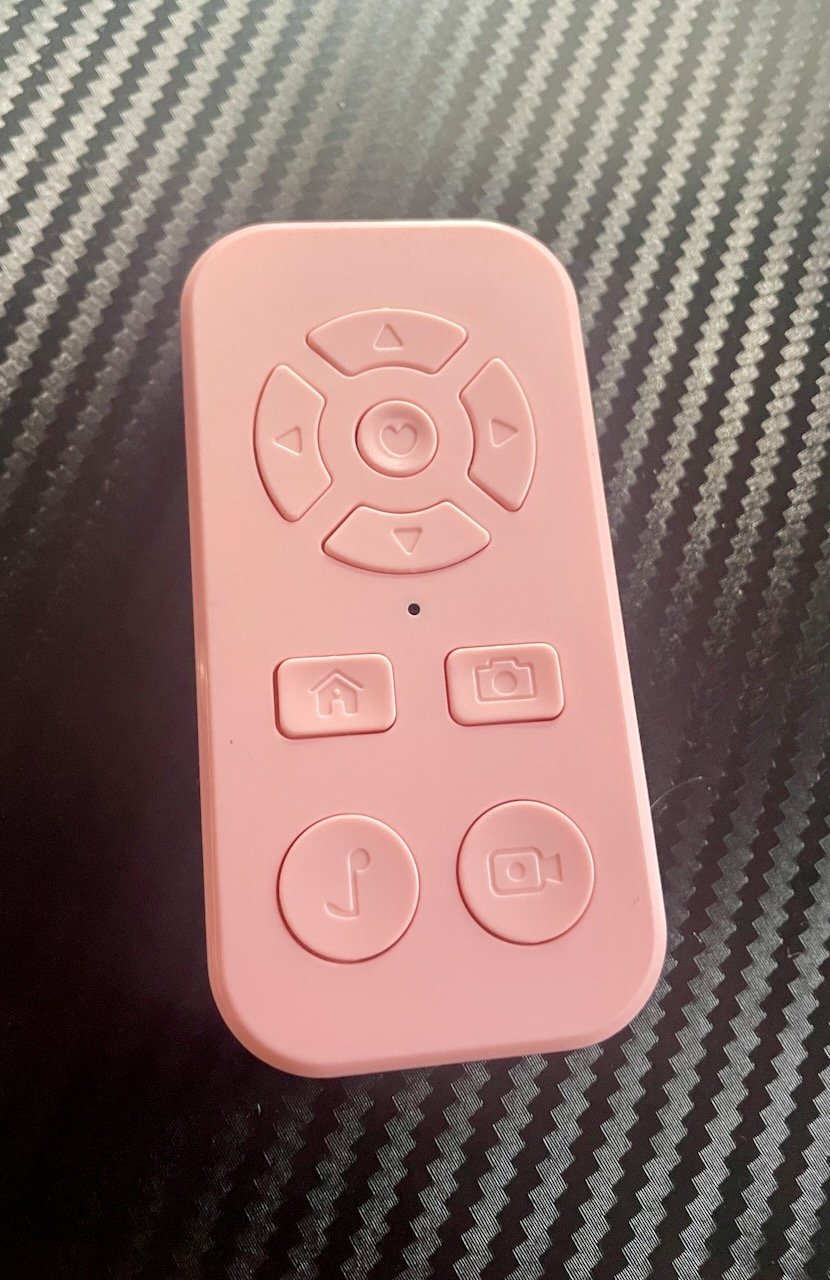
A friend is running Batocera as a media/emulation box and wanted to use a Beauty R1 Bluetooth remote with Kodi. The R1 is a hyper-affordable bluetooth media remote — and it emits mouse movement events instead of regular key presses, and Batocera's underlying buildroot Linux has no idea what to do with it out of the box. It pairs just fine using Bluetooth 4.2 tho. evtest does show some output on each button press. But nothing seems to happen in the EmulationStation or Kodi GUI.
The fix is a small Python daemon that grabs the R1's input device exclusively and translates its events into keyboard events Kodi understands.
Why it’s tricky
Running evtest on the device reveals something challenging: every directional press
arrives as three separate event groups before BTN_LEFT is even set:
REL_X=-2047, REL_Y=+2047  ← calibration spike (ignore!)
REL_X=+148,  REL_Y=-354   ← return-to-center offset
BTN_LEFT=1                 ← actual button down
REL_Y=+77 (×2)            ← real directional data
BTN_LEFT=0                 ← button up
all that REL data before the button press results in RIGHT + ENTER on every single keystroke. Took a while to figure out.
The other fun one: the Camcorder button sends the same BTN_LEFT sequence as the directional pad and center button — but its pre-BTN_LEFT offset is REL_Y ≈ -30 instead of ≈ -354. That tiny difference is the only way to tell them apart.
The solution
- Ignore all REL events with |value| ≥ 1000 — these calibration spikes and should be discarded.
- Track
pre_ybeforeBTN_LEFT=1— ifabs(pre_y) < 100, it’s the Camcorder button → sendKEY_ESC. Otherwise it’s probably a nav key or center. direction_sentflag — once a direction has been emitted, suppress the ENTER that would follow onBTN_LEFT=0.
Key mapping
| Beauty R1 button | Sends | Kodi action |
|---|---|---|
| D-pad Up | KEY_UP | Navigate up |
| D-pad Down | KEY_DOWN | Navigate down |
| D-pad Left | KEY_LEFT | Navigate left / rewind |
| D-pad Right | KEY_RIGHT | Navigate right / forward |
| Center (OK) | KEY_ENTER | Select / Play-Pause |
| Home | KEY_VOLUMEDOWN | Volume down |
| Camera | KEY_VOLUMEUP | Volume up |
| Camcorder | KEY_ESC | Back / close menu |
Note: the Camera button sends KEY_VOLUMEDOWN — the script remaps it to KEY_VOLUMEUP. The Home button sends KEY_HOMEPAGE — remapped to KEY_VOLUMEDOWN because that’s the desired remote button layout of choice.
The script
Save to /userdata/system/beauty_r1_mapper.py:
show script
#!/usr/bin/env python3
"""
Beauty R1 Bluetooth Remote → Kodi Keyboard Mapper
"""

import evdev
from evdev import InputDevice, UInput, ecodes
import sys

e = ecodes

DEVICE_NAMES = ["Beauty", "beauty", "R1", "r1"]
THRESHOLD = 50
SPIKE     = 1000

def find_beauty_r1():
    devices = [InputDevice(path) for path in evdev.list_devices()]
    for device in devices:
        for name in DEVICE_NAMES:
            if name in device.name:
                print(f"Found: {device.name} ({device.path})")
                return device
    print("Beauty R1 not found. Available devices:")
    for device in devices:
        print(f"  - {device.name} ({device.path})")
    return None

def main():
    r1_device = find_beauty_r1()
    if not r1_device:
        sys.exit(1)

    try:
        r1_device.grab()
    except IOError as err:
        print(f"Failed to grab device: {err}")
        sys.exit(1)

    capabilities = {
        e.EV_KEY: [
            e.KEY_UP, e.KEY_DOWN, e.KEY_LEFT, e.KEY_RIGHT,
            e.KEY_ENTER, e.KEY_ESC, e.KEY_VOLUMEUP, e.KEY_VOLUMEDOWN,
        ]
    }
    ui = UInput(capabilities, name="Beauty R1 Virtual Keyboard")
    print("Mapper running. Ctrl+C to quit.")

    button_pressed = False
    direction_sent = False
    is_camcorder   = False
    pre_y  = 0
    post_x = 0
    post_y = 0

    try:
        for event in r1_device.read_loop():

            if event.type == e.EV_REL:
                if abs(event.value) >= SPIKE:
                    continue
                if not button_pressed:
                    if event.code == e.REL_Y:
                        pre_y += event.value
                else:
                    if not direction_sent:
                        if event.code == e.REL_X:
                            post_x += event.value
                        elif event.code == e.REL_Y:
                            post_y += event.value

            elif event.type == e.EV_KEY:

                if event.code == e.BTN_LEFT:
                    if event.value == 1:
                        button_pressed = True
                        direction_sent = False
                        post_x = 0
                        post_y = 0
                        is_camcorder = abs(pre_y) < 100
                        pre_y = 0
                    elif event.value == 0:
                        if is_camcorder:
                            ui.write(e.EV_KEY, e.KEY_ESC, 1)
                            ui.write(e.EV_KEY, e.KEY_ESC, 0)
                            ui.syn()
                            print("→ ESC (Camcorder)")
                        elif not direction_sent:
                            ui.write(e.EV_KEY, e.KEY_ENTER, 1)
                            ui.write(e.EV_KEY, e.KEY_ENTER, 0)
                            ui.syn()
                            print("→ ENTER")
                        button_pressed = False
                        direction_sent = False
                        is_camcorder   = False
                        post_x = 0
                        post_y = 0

                elif event.code == e.KEY_HOMEPAGE:
                    if event.value == 1:
                        ui.write(e.EV_KEY, e.KEY_VOLUMEDOWN, 1)
                        ui.write(e.EV_KEY, e.KEY_VOLUMEDOWN, 0)
                        ui.syn()
                        print("→ VOLUME DOWN (Home)")

                elif event.code == e.KEY_VOLUMEDOWN:
                    if event.value == 1:
                        ui.write(e.EV_KEY, e.KEY_VOLUMEUP, 1)
                        ui.write(e.EV_KEY, e.KEY_VOLUMEUP, 0)
                        ui.syn()
                        print("→ VOLUME UP (Camera)")

            elif event.type == e.EV_SYN:
                if button_pressed and not direction_sent and not is_camcorder:
                    if abs(post_x) >= THRESHOLD or abs(post_y) >= THRESHOLD:
                        if abs(post_y) >= abs(post_x):
                            key, name = (e.KEY_UP, "UP") if post_y > 0 \
                                   else (e.KEY_DOWN, "DOWN")
                        else:
                            key, name = (e.KEY_LEFT, "LEFT") if post_x > 0 \
                                   else (e.KEY_RIGHT, "RIGHT")
                        ui.write(e.EV_KEY, key, 1)
                        ui.write(e.EV_KEY, key, 0)
                        ui.syn()
                        print(f"→ {name}")
                        direction_sent = True
                        post_x = 0
                        post_y = 0

    except KeyboardInterrupt:
        print("\nStopped.")
    finally:
        r1_device.ungrab()
        ui.close()

if __name__ == "__main__":
    main()
#!/usr/bin/env python3
"""
Beauty R1 Bluetooth Remote → Kodi Keyboard Mapper
"""
import evdev
from evdev import InputDevice, UInput, ecodes
import sys
e = ecodes
DEVICE_NAMES = ["Beauty", "beauty", "R1", "r1"]
THRESHOLD = 50
SPIKE = 1000
def find_beauty_r1():
devices = [InputDevice(path) for path in evdev.list_devices()]
for device in devices:
for name in DEVICE_NAMES:
if name in device.name:
print(f"Found: {device.name} ({device.path})")
return device
print("Beauty R1 not found. Available devices:")
for device in devices:
print(f" - {device.name} ({device.path})")
return None
def main():
r1_device = find_beauty_r1()
if not r1_device:
sys.exit(1)
try:
r1_device.grab()
except IOError as err:
print(f"Failed to grab device: {err}")
sys.exit(1)
capabilities = {
e.EV_KEY: [
e.KEY_UP, e.KEY_DOWN, e.KEY_LEFT, e.KEY_RIGHT,
e.KEY_ENTER, e.KEY_ESC, e.KEY_VOLUMEUP, e.KEY_VOLUMEDOWN,
]
}
ui = UInput(capabilities, name="Beauty R1 Virtual Keyboard")
print("Mapper running. Ctrl+C to quit.")
button_pressed = False
direction_sent = False
is_camcorder = False
pre_y = 0
post_x = 0
post_y = 0
try:
for event in r1_device.read_loop():
if event.type == e.EV_REL:
if abs(event.value) >= SPIKE:
continue
if not button_pressed:
if event.code == e.REL_Y:
pre_y += event.value
else:
if not direction_sent:
if event.code == e.REL_X:
post_x += event.value
elif event.code == e.REL_Y:
post_y += event.value
elif event.type == e.EV_KEY:
if event.code == e.BTN_LEFT:
if event.value == 1:
button_pressed = True
direction_sent = False
post_x = 0
post_y = 0
is_camcorder = abs(pre_y) < 100
pre_y = 0
elif event.value == 0:
if is_camcorder:
ui.write(e.EV_KEY, e.KEY_ESC, 1)
ui.write(e.EV_KEY, e.KEY_ESC, 0)
ui.syn()
print("→ ESC (Camcorder)")
elif not direction_sent:
ui.write(e.EV_KEY, e.KEY_ENTER, 1)
ui.write(e.EV_KEY, e.KEY_ENTER, 0)
ui.syn()
print("→ ENTER")
button_pressed = False
direction_sent = False
is_camcorder = False
post_x = 0
post_y = 0
elif event.code == e.KEY_HOMEPAGE:
if event.value == 1:
ui.write(e.EV_KEY, e.KEY_VOLUMEDOWN, 1)
ui.write(e.EV_KEY, e.KEY_VOLUMEDOWN, 0)
ui.syn()
print("→ VOLUME DOWN (Home)")
elif event.code == e.KEY_VOLUMEDOWN:
if event.value == 1:
ui.write(e.EV_KEY, e.KEY_VOLUMEUP, 1)
ui.write(e.EV_KEY, e.KEY_VOLUMEUP, 0)
ui.syn()
print("→ VOLUME UP (Camera)")
elif event.type == e.EV_SYN:
if button_pressed and not direction_sent and not is_camcorder:
if abs(post_x) >= THRESHOLD or abs(post_y) >= THRESHOLD:
if abs(post_y) >= abs(post_x):
key, name = (e.KEY_UP, "UP") if post_y > 0 \
else (e.KEY_DOWN, "DOWN")
else:
key, name = (e.KEY_LEFT, "LEFT") if post_x > 0 \
else (e.KEY_RIGHT, "RIGHT")
ui.write(e.EV_KEY, key, 1)
ui.write(e.EV_KEY, key, 0)
ui.syn()
print(f"→ {name}")
direction_sent = True
post_x = 0
post_y = 0
except KeyboardInterrupt:
print("\nStopped.")
finally:
r1_device.ungrab()
ui.close()
if __name__ == "__main__":
main()make it executable: chmod +x /userdata/system/beauty_r1_mapper.py
test with python3 /userdata/system/beauty_r1_mapper.py
Using it on Android
If you aren’t running Linux/Batocera but rather an Android device and want to fix the Beauty R1 remote’s mapping, check out Luca’s work on GitHub:
beauty-r1-android-interceptor by olivluca
Luca came up with logic to intercept and translate the remote’s events on Android and wrote a C program to do so.