and 3x
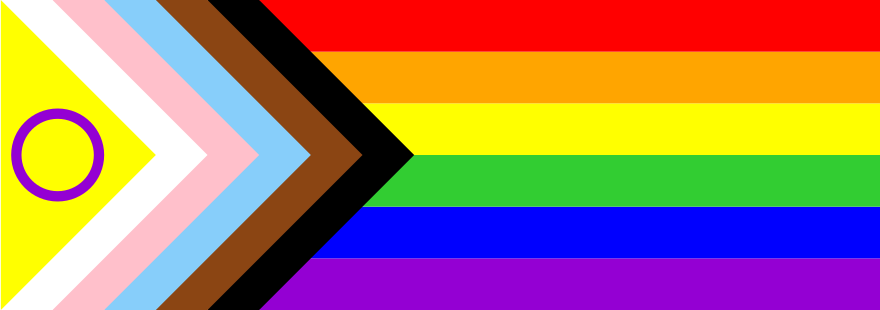
<svg width="88" height="31"
  version="1.1"
  viewBox="0 0 17 6"
  xmlns="http://www.w3.org/2000/svg">
 <path d="m 5 5 h 13 v 1 H 5 z" fill="darkviolet"/>
 <path d="m 5 4 h 13 v 1 H 5 z" fill="blue"/>
 <path d="m 5 3 h 13 v 1 H 5 z" fill="limegreen"/>
 <path d="m 5 2 h 13 v 1 H 5 z" fill="yellow"/>
 <path d="m 5 1 h 13 v 1 H 5 z" fill="orange"/>
 <path d="m 5 0 h 13 v 1 H 5 z" fill="red"/>
 <path d="m 4 0 h 1 l 3 3 -3 3 h-1 z" fill="black"/>
 <path d="m 3 0 h 1 l 3 3 -3 3 h-1 z" fill="saddlebrown"/>
 <path d="m 2 0 h 1 l 3 3 -3 3 h-1 z" fill="lightskyblue"/>
 <path d="m 1 0 h 1 l 3 3 -3 3 h-1 z" fill="pink"/>
 <path d="m 0 0 h 1 l 3 3 -3 3 h-1 z" fill="white"/>
 <path d="m 0 0 h 0 l 3 3 -3 3 h 0 z" fill="yellow"/>
 <circle cx="1.1" cy="3" r=".8"
   fill="none" stroke="darkviolet" stroke-width=".2"/>
</svg>
this version uses six paths (polygons) (rectangles) for stripes, and six paths (more polygons) (squared-off triangles) for the chevrons. and a circle.
svg path data looks gross if you've never seen it before but you can get used to it.
look at the line ending in "lightskyblue." you can find that piece of the chevron and follow along:
<path d="        here comes data! all paths start in the upper left at 0,0
   m 2 0         move without drawing, 2 units to the right, 0 units down.
   h 1           begin drawing with a horizontal line, 1 unit to the right.
   l 3 3         draw a line to the position 3 units to the right and 3 units down.
    -3 3         and then again three units back to the left but 3 more units down.
   h-1           draw horizontally 1 unit left.
   z             draw straight back to the beginning (2,0) to close the shape.
" fill="lightskyblue"/>
that results in a triangle with a small squared off end. you don't see the squared off part because it gets covered up by the next `path`: the same shape but pink.
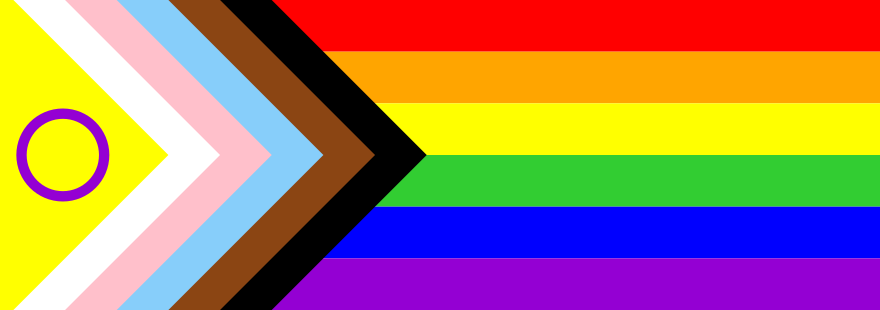
<svg width="88" height="31"
  version="1.1"
  viewBox="0 0 17 6"
  xmlns="http://www.w3.org/2000/svg">
  <defs>
    <rect id="s" x="5" y="0" height="1" width="13" />
    <rect id="c" x="0" y="0" height="6" width="6"
      transform="rotate(45 3 3)" />
  </defs>
  <use href="#s" y=" 0" fill="red" />
  <use href="#s" y=" 1" fill="orange" />
  <use href="#s" y=" 2" fill="yellow" />
  <use href="#s" y=" 3" fill="limegreen" />
  <use href="#s" y=" 4" fill="blue" />
  <use href="#s" y=" 5" fill="darkviolet" />
  <use href="#c" x=" 1" fill="black" />
  <use href="#c" x=" 0" fill="saddlebrown" />
  <use href="#c" x="-1" fill="lightskyblue" />
  <use href="#c" x="-2" fill="pink" />
  <use href="#c" x="-3" fill="white" />
  <use href="#c" x="-4" fill="yellow" />
  <circle cx="1.2" cy="3" r=".8"
    fill="none" stroke="darkviolet" stroke-width=".2" />
</svg>
svg lets you define some shapes then refer back to them, basically cloning them to wherever else you want.
maybe, i thought, building this that way would be less code and easier to read.
instead of polygon paths, i used rect (rectangles). six for the stripes, and six squares rotated 45 degrees for the chevrons.
most of that falls outside the viewable area so you only see the corners, and a stack of those makes chevrons.
maybe this is easier to read and understand. each line is indeed shorter. it is not, however, a smaller total number of bytes. oh well.